Quick Start
Get a merchant device from zero to its first payment in four steps.
Get an activation code (TMS Portal)
- Log in to the TMS Portal.
- Go to Merchant, then search for and select the merchant profile.
- Open the Activation Code tab and click + Create.
- Copy the code or share it with the merchant.
Activate the app
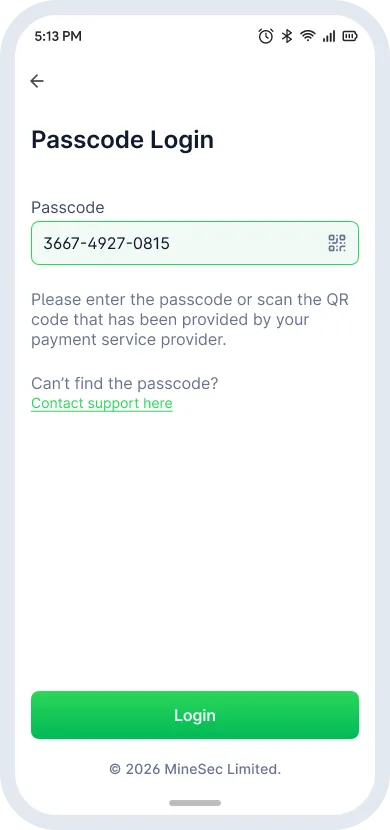
- Open the MineSec Pay 7 app on the device.
- Enter the activation code, or scan the QR code if available.
- Tap Login to activate the terminal.
Accept your first payment
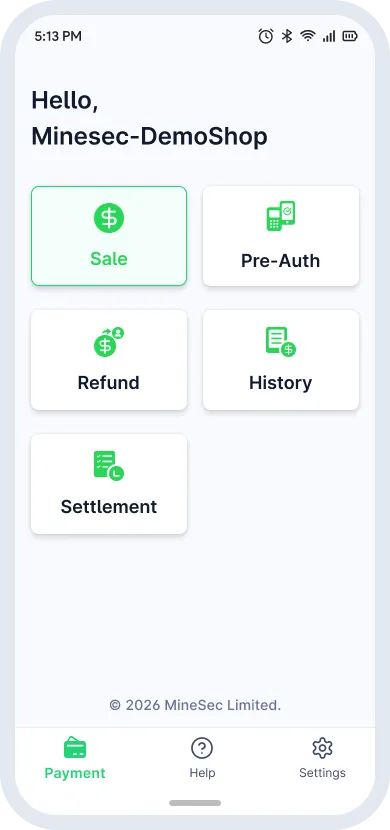
- Tap Sale on the homepage.
- Enter the amount and tap Charge.
- Choose Card, Merchant QR or Consumer QR.
- Complete the payment and issue a receipt by Email, QR, E-Receipt or Share.
View transaction history
- Tap History on the homepage.
- Select a transaction to view its details.
- Void, refund or reissue a receipt from the details page.
Lost the activation code? Tap Contact support here on the login screen and enter the registered email. A new code is sent to that inbox.