MineSec Pay 7
MineSec Pay 7 is MineSec's ready-made SoftPOS payment app, certified to PCI MPoC. It runs the whole card-present transaction on the merchant's device and connects to the MineSec payment backend. You launch it under your own brand, manage terminals remotely through TMS, and let merchant POS systems start payments through the POS API.
→ Download from the Play Store (opens in a new tab)
Architecture
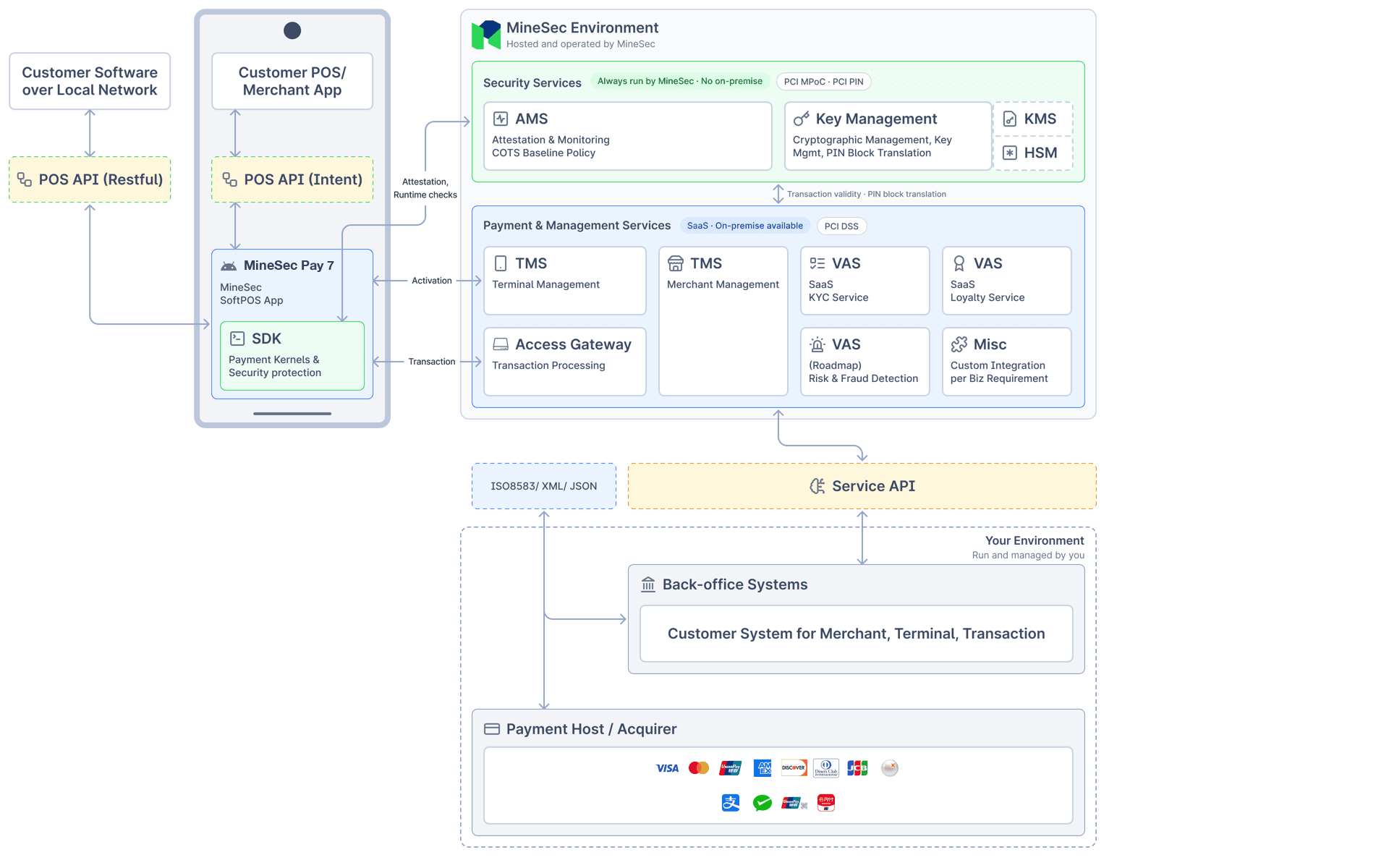
- On the device, MineSec Pay 7 runs on the Embedded Payment SDK, which holds the payment kernels and security protection. A POS or merchant app on the same device calls it through the POS API (Intent); customer software on the local network calls it through the POS API (RESTful).
- Security services (Attestation & Monitoring, Key Management) always run in the MineSec environment.
- Payment & management services (Access Gateway, TMS, value-added services) run as SaaS, or on-premise on request.
- Your environment connects to your payment host or acquirer through ISO 8583, XML or JSON, and to your back-office systems through the Service API.
Transactions
- Sale, with tips, installment (IPP), DCC and multi-currency where your acquirer supports them
- Void and refund
- Pre-authorization, authorization completion and incremental authorization
- QR payments (consumer-presented and merchant-presented)
- Reversal
- Settlement
Each transaction type and payment method can be enabled or disabled per terminal through TMS.
Features
- Your brand: Level 1 derives the full palette from your brand colour. Level 2 adds the full colour palette, fonts, logos and app name, plus the UIKit source to redesign the screens. See UI customization.
- Remote configuration per terminal: transaction types, payment methods, acquirer and DCC parameters, kiosk mode and EMV parameters, through the TMS Portal or the TMS API.
- POS integration: App2App on the same device, Local PayServer on the local network, and Cloud POS Connector for kiosks. See the POS API.
- Kiosk mode with idle signage, for self-service sites.
- Receipts: printed on the terminal's built-in printer, or shared digitally by QR code, email or tap.
- Devices: phones and terminals with screens from 4 inches (480 × 480) up to 1920 × 1080, portrait or landscape, including dual-screen terminals.
Device Requirements
- Android: Android 11 (API level 30) or later, with NFC, a camera for QR payments, and at least 1 GB of free storage and 1 GB of memory. Recommended: 2 GB of free storage and 4 GB of memory.
- iOS: iOS 18 or later.
- PCI PTS terminals: Landi P30 and P10, Newland N950, SUNMI P3.
- The device must receive security updates and have a recent security patch level.
- The device must support hardware-backed key attestation.
- The device must not be rooted, and its bootloader must be locked.
- The device must pass the Android compatibility test.
- No hooking framework (for example Frida or Xposed) may be installed on the device.
Upgrading from MSA 2.0
MineSec Pay 7 keeps the MSA 2.0 POS integration format and the MSA 2.0 Local PayServer port (8000), so existing
PayServer integrations keep working. App2App integrations need one change: upgrade poslib to 1.2.18 and create
MsaPosApi with isUseMSA3 = true. See Quickstart (App to App).
MSA 2.0 gets no new features from November 1, 2026 and reaches end of life on September 1, 2027.