How the Embedded Payment SDK works
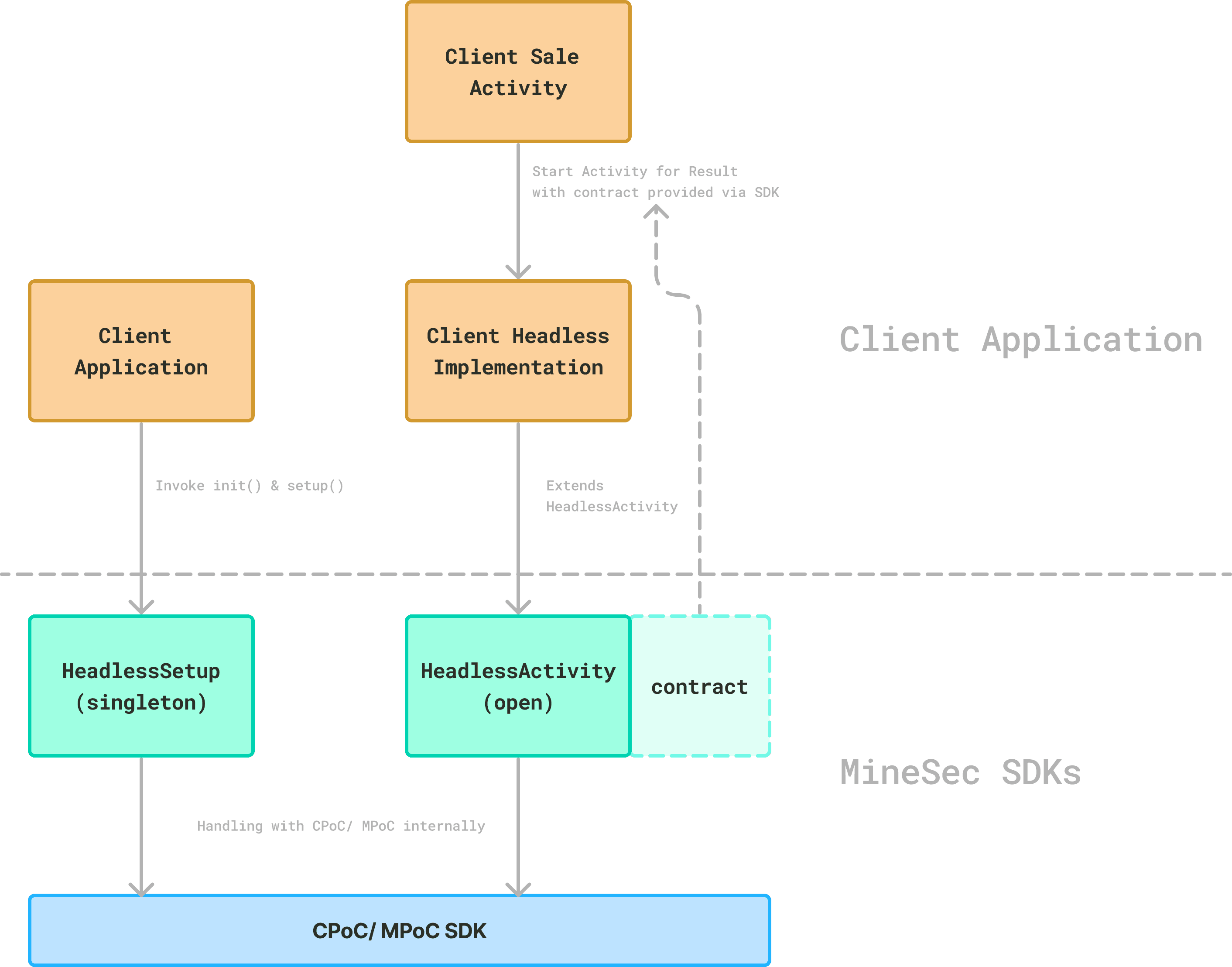
There are 2 primary components from the SDK - HeadlessSetup & HeadlessActivity:
HeadlessSetupis an object for non-UI setupsinitSoftPosinitializes the MPoC Isolated SDK under the hood.initialSetuploads the default config and the keys from MineSec for later transactions.
HeadlessActivityis a base android activity- For customer to inherit and provide the UI
- Provide the contract for android's
startActivityForResult - Internally, the activity uses the MPoC Isolated SDK to read the card.
- For each transaction, the encrypted data is sent to MineSec Access Gateway for processing.
Note that the card read data is processed by MineSec Access Gateway. For more details, see Access Gateway.
Environment Provision
For each customer, MineSec first provisions Access Gateway with the corresponding handling and config.
Profile Creation
Once the environment is provisioned, the customer can create and manage the profile and acceptance.
Access Gateway uses a concept of acceptance. The acceptance is an entity that holds information like the MID, TID, host message format, and other information that will be used when doing a payment message request to the upstream acquirer or payment gateway.
A profile is then holding the binding to one or multiple acceptance.
For example one profile (e.g. with profileId
prof_01J1VF63D8E6QFCTAJQ7ACSC4W) can bind to
- a gateway with
hostMessageFormat: MPGS_AP, withMID: 123andTID: 456- another gateway with
hostMessageFormat: AMEX_GCAG, withMID: 987andTID: 654From the application side (with the Embedded Payment SDK), after a card reading, the SDK sends the encrypted data to Access Gateway.
Based on the payment method read and the service configuration, Access Gateway knows how to route and construct the corresponding payment message.
The connection from Access Gateway to your payment host is either built by MineSec (a paid service), or built by you on the Outbound Host API.
New App Install
For a freshly installed application, it would need to register the SDK first, underneath the SDK does an initial attestation and gets back the sdkId from MineSec Attestation & Monitoring.
After the SDK is registered, the app can call the initial setup for some initial param download and key loading. This initial setup is only required once per application.
Each App Launch
Each time the application is launched, it needs to call initSoftPos before reading cards.
So we recommend calling initSoftPos in your Application.onCreate.
Making Transaction Request
Making transaction request to the Embedded Payment SDK is straightforward. Request with
profileId- for the routing/ message format lookup & constructing the payment message in Access Gateway- request amount
There are some other optional request parameter, check details in the API section.
After the Embedded Payment SDK receives the request, it'll load the corresponding EMV config, perform the card read, encrypt the data and send it to Access Gateway for host processing.
Timeouts and automatic reversal
If the connection drops or times out while the transaction request is in flight, the SDK can't tell whether the payment host already processed it. It never assumes failure. The SDK:
- Queries the same request again a few times, as the response may only be delayed. If the outcome is found, the normal result (approved or declined) is returned.
- If the outcome is still unknown, automatically sends a reversal for that request. The result is then
43_003(NetworkServerSideError) and it is safe to retry the payment. - If the reversal can't be completed, the result is
43_004(PendingReversalFailed). Don't retry blindly, reconcile that transaction manually first.
The pending request is also remembered on the device. If the app was killed before it finished, the SDK completes the reversal at the next launch, before starting a new transaction, and returns 43_004 if that fails. No code is needed in your app, but handle 43_003 and 43_004 in your result handling.